

Hello, dear readers! I hope you are all doing well. Today, we are going to discuss how to write a professional CV with no work experience. Many fresh graduates and first-time job seekers struggle to create a CV because they have never worked in a formal position. They often wonder what information they should include and how they can impress employers without previous work experience.
The good news is that you do not need years of professional experience to create an effective CV. Your educational qualifications, relevant skills, academic projects, training, certifications, and extracurricular activities can demonstrate your potential to employers. In this article, you will learn how to write a professional CV from scratch, what information to include, which mistakes to avoid, and how to present yourself as a strong candidate for your first job. Without further ado, let’s get started!
1. Why Do You Need a Professional CV Without Work Experience?
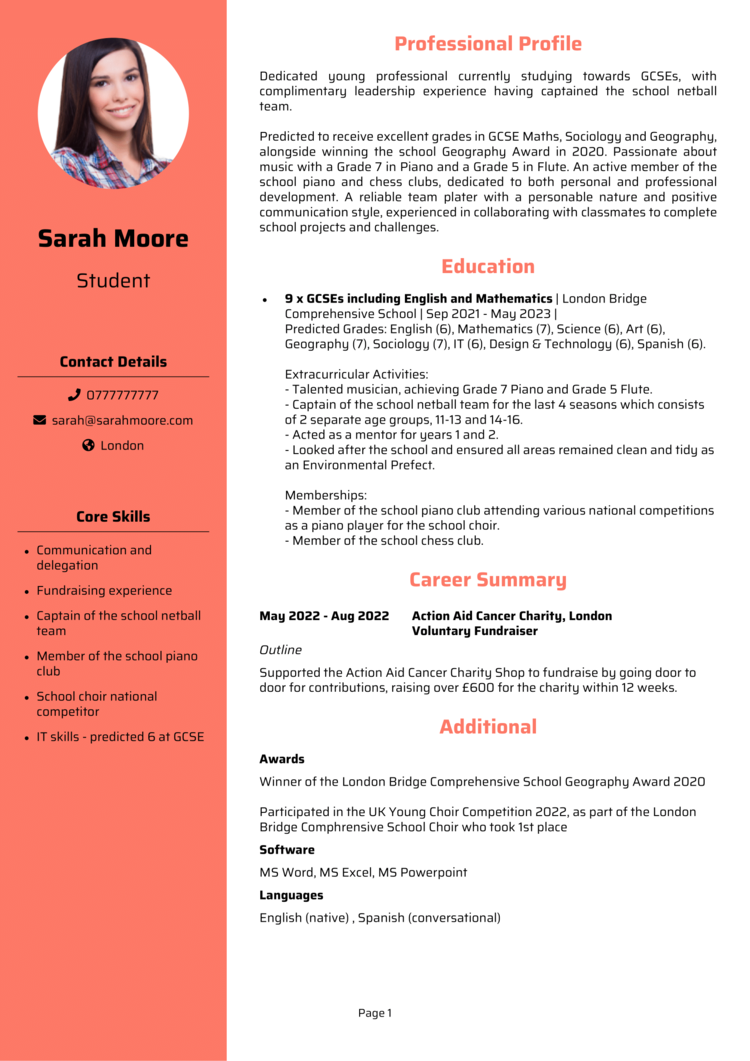
A CV, or Curriculum Vitae, is an important document that summarizes your educational background, skills, qualifications, and relevant experience. Employers use it to assess whether a candidate is suitable for a particular position.
Even if you have never held a formal job, a well-written CV can help you demonstrate your abilities, enthusiasm, and willingness to learn.
Here are some important things you can highlight in your CV:
- Educational Qualifications: Include your degrees, academic results, relevant coursework, and notable academic achievements.
- Technical Skills: Mention relevant abilities, such as Microsoft Office, graphic design, programming, data entry, or digital marketing.
- Soft Skills: Highlight communication, teamwork, time management, adaptability, and problem-solving skills.
- Training and Certifications: Include relevant courses, workshops, and professional certifications.
- Projects and Activities: Describe academic projects, personal projects, volunteer work, and extracurricular activities that demonstrate your abilities.
Remember, your goal is not to pretend that you have professional experience. Instead, focus on showing employers what you can do, what you have learned, and how you can contribute to their organization.
2. How to Write a Professional CV With No Work Experience: Step-by-Step Guide

Creating a professional CV becomes much easier when you follow a clear structure. The following steps will help you organize your information and present your qualifications effectively.
Step 1: Add Your Name and Contact Information
Start your CV with your full name and essential contact details. Make sure employers can easily contact you if they want to discuss your application.
Include the following information:
- Full name
- Phone number
- Professional email address
- City and country
- LinkedIn profile or portfolio link, if relevant
Example:
Rahim Ahmed
Phone: +8801XXXXXXXXX
Email: rahim.ahmed@email.com
Location: Dhaka, Bangladesh
LinkedIn: linkedin.com/in/your-profile
Use accurate contact information and a professional email address. Avoid including unnecessary personal details, such as your national identification number or unrelated family information.
Step 2: Write a Strong Professional Summary

A professional summary is a brief introduction at the beginning of your CV. It highlights your relevant qualifications, key skills, and career goals in two or three sentences.
Since you do not have previous work experience, focus on your education, transferable skills, relevant projects, and enthusiasm for the position.
Example of a Professional Summary:
“A motivated and detail-oriented recent graduate seeking an entry-level position where I can apply my communication, problem-solving, and computer skills. Eager to learn new technologies, contribute to team goals, and develop professionally in a challenging work environment.”
Customize your summary for each position you apply for. For example, if you are applying for a graphic design position, emphasize your design skills, familiarity with relevant software, and portfolio.
Step 3: Highlight Your Educational Qualifications
When you have no work experience, your educational background can play an important role in your CV. List your most recent qualification first, followed by earlier qualifications if they are relevant.
Include the following details:
- Degree or examination name
- Name of the institution
- Major or field of study
- Graduation or passing year
- GPA or CGPA, if relevant
Example:
Bachelor of Business Administration (BBA)
ABC University, Bangladesh
Graduation Year: 2025
CGPA: 3.50 out of 4.00
Higher Secondary Certificate (HSC)
XYZ College, Bangladesh
Group: Business Studies
Passing Year: 2021
GPA: 4.50 out of 5.00
Include relevant academic achievements, coursework, or projects that support your application. Always provide accurate information about your qualifications and results.
Step 4: Showcase Your Skills and Abilities
Even without professional experience, you may already possess skills that employers value. The key is to identify the skills that match the requirements of your target position.
Examples of Technical Skills:
- Microsoft Word, Excel, and PowerPoint
- Email and Internet Communication
- Basic Computer Operations
- Graphic Design
- Data Entry
- HTML, CSS, or Programming
- Social Media Management
- Content Writing
Examples of Soft Skills:
- Communication
- Teamwork and Collaboration
- Time Management
- Problem-Solving
- Adaptability
- Critical Thinking
- Organization
- Attention to Detail
You do not need to include every skill you possess. Instead, select three to six relevant skills that match the job description.
Be honest about your abilities. If you have only basic knowledge of a particular tool, do not describe yourself as an expert.
Step 5: Include Relevant Training and Certifications
Training programs, online courses, and certifications can demonstrate your commitment to learning and professional development.
If you have completed relevant courses, include them in a separate section.
Examples:
- Digital Marketing Fundamentals — Course Provider, 2025
- Microsoft Excel Training — Training Institute, 2025
- Graphic Design Basics — Course Provider, 2024
- English Communication Skills — Training Institute, 2024
Mention the course name, training provider, and completion year. You may also include a certificate link when appropriate.
Focus on courses that are relevant to the job you want. A few valuable certifications are generally more useful than a long list of unrelated courses.
Step 6: Highlight Projects, Volunteer Work, and Extracurricular Activities
You do not need a formal job to gain useful experience. Academic assignments, personal projects, volunteer activities, and student organizations can help demonstrate your abilities.
Consider including:
- University or college projects
- Volunteer work
- Participation in student clubs
- Personal websites or applications
- Graphic design or writing portfolios
- Event organization
- Team leadership activities
Example: Academic Project — Social Media Marketing Plan
- Developed a social media content plan for a sample brand.
- Identified a target audience and created relevant content ideas.
- Prepared a content calendar to demonstrate an understanding of digital marketing principles.
Describe only projects you have actually completed. If you do not have any relevant projects, consider creating a small personal project to demonstrate your skills.
For example, an aspiring content writer could prepare three sample blog posts, while a beginner graphic designer could create a portfolio of original designs.
3. Professional CV Format and Template for Freshers
A professional CV should be clear, organized, and easy to read. For many entry-level applicants, a one-page CV is a practical starting point, although the ideal length depends on the applicant’s qualifications and the requirements of the position.
Use the following template to create your own CV.
Professional CV Template for Beginners
[YOUR FULL NAME]
Phone: [Your Phone Number]
Email: [Your Professional Email Address]
Location: [City, Country]
LinkedIn/Portfolio: [Your Profile or Portfolio Link]
PROFESSIONAL SUMMARY
A motivated and enthusiastic recent graduate seeking an entry-level position in [Target Industry]. Possess skills in [Relevant Skill 1], [Relevant Skill 2], and [Relevant Skill 3]. Eager to learn, contribute to organizational goals, and develop professional expertise.
EDUCATION
- Degree: [Degree Name]
- Institution: [University or College Name]
- Graduation Year: [Year]
- Result: [GPA/CGPA, if relevant]
TECHNICAL SKILLS
- [Relevant Skill 1]
- [Relevant Skill 2]
- [Relevant Skill 3]
PROJECTS
- Project Name: [Your Project Name]
- Description: [Briefly describe what you did and what you learned]
- Tools Used: [Relevant Tools or Software]
TRAINING AND CERTIFICATIONS
- [Course or Certificate Name] — [Provider], [Year]
VOLUNTEER WORK AND ACTIVITIES
- Organization or Activity: [Name]
- Role and Responsibilities: [Brief Description]
LANGUAGES
- Bengali — Native
- English — [Your Actual Proficiency Level]
Customize this template using your own information. If you do not have relevant projects, certifications, or volunteer experience, you can omit those sections.
4. Essential Tips for Creating a Professional CV
A strong CV should not only contain accurate information but also present it in a clear and professional format.
Follow these practical tips to improve the quality of your CV.
Keep the Design Simple and Professional
Use a clean layout, consistent formatting, and readable fonts. Avoid excessive colors, unnecessary graphics, and complicated designs that make your information difficult to read.
Use Bullet Points
Present your skills, responsibilities, and achievements in short bullet points rather than long paragraphs. This makes your CV easier to scan.
Use Strong Action Verbs
When describing projects or activities, begin with clear action verbs such as Created, Developed, Organized, Assisted, and Coordinated.
For example, instead of writing “I was involved in a college event,” you could write, “Coordinated event activities and supported the organizing team.”
Only use descriptions that accurately reflect what you did.
Customize Your CV for Every Job
Read the job description carefully before applying. Identify the relevant skills and qualifications requested by the employer, then highlight the ones you genuinely possess.
A customized CV can help employers understand why you are a suitable candidate for the position.
Check Spelling and Grammar
Grammar and spelling mistakes can make your CV appear less professional. Proofread the entire document before submitting it.
You can also use grammar-checking tools, but review their suggestions carefully to ensure that the final wording is accurate and natural.
Use a Professional Email Address
Choose an email address that includes your name or a suitable variation of it. Avoid usernames that appear unprofessional.
Save Your CV in the Appropriate Format
Follow the employer’s instructions regarding file format. If no format is specified, PDF is generally a good option because it helps preserve the document’s layout.
Use a clear file name, such as Rahim_Ahmed_CV.pdf.
Make Your CV ATS-Friendly
Many employers use Applicant Tracking Systems (ATS) to help manage job applications. To improve readability and compatibility:
- Use standard headings such as Education, Skills, and Projects.
- Include relevant keywords from the job description when they accurately describe your qualifications.
- Avoid unnecessarily complicated layouts and excessive graphics.
- Follow the employer’s instructions about file formats and application requirements.
No particular CV format guarantees that an applicant will pass every ATS screening system, so focus on clarity, relevance, and accuracy.
5. Common CV Writing Mistakes to Avoid
Many first-time job seekers make avoidable mistakes when preparing their CVs. Being aware of these issues can help you present yourself more effectively.
- Including Irrelevant Information: Focus on details that support your suitability for the position.
- Using the Same CV for Every Job: Adjust your professional summary and relevant skills to match each opportunity.
- Exaggerating Your Abilities: Never claim skills, qualifications, or experience you do not possess.
- Using Vague Statements: Replace general phrases such as “I am a good person” with specific examples of your abilities.
- Providing Incorrect Contact Details: Double-check your phone number and email address before submitting your application.
- Using an Overly Complicated Design: Choose a format that allows employers to find important information quickly.
- Ignoring the Job Description: Make sure your application follows the employer’s stated requirements.
The most important principle is to create a CV that is honest, relevant, and easy to understand.
6. Frequently Asked Questions (FAQ)
1. Can I Create a CV Without Work Experience?
Yes. You can create a professional CV by highlighting your education, skills, certifications, academic projects, personal projects, and relevant extracurricular activities.
2. How Long Should a Fresher’s CV Be?
A one-page CV is often a good starting point for fresh graduates and entry-level applicants. However, the appropriate length depends on your relevant qualifications and the employer’s requirements.
3. Is a Professional Summary Necessary for a Fresher’s CV?
A professional summary is not mandatory for every application, but a concise and relevant summary can help employers quickly understand your career goals and key strengths.
4. What Should I Include in a CV If I Have No Work Experience?
Include your educational qualifications, relevant skills, training, certifications, academic or personal projects, and volunteer activities, where applicable.
5. Is a Photograph Necessary for a Professional CV?
No. A photograph is generally not required unless the employer or application guidelines specifically request one. Follow the instructions provided for the position.
6. Should I Submit My CV in Word or PDF Format?
Follow the employer’s instructions. If no specific format is requested, PDF is generally a suitable choice because it helps preserve the document’s formatting across devices.
7. Conclusion
Writing a professional CV without work experience may seem challenging, but it is entirely possible with the right approach. By highlighting your educational qualifications, relevant skills, training, certifications, and projects, you can create a CV that demonstrates your potential to employers.
Keep your CV concise, use clear and professional language, tailor it to each job application, and check it carefully before submitting it. At the same time, continue developing your skills through practical projects, relevant courses, and other learning opportunities.
Remember, a well-written CV does not guarantee a job offer, but it can help you present your qualifications effectively and make a positive first impression.
We hope this guide has helped you understand how to write a professional CV with no work experience. If you found this article useful, share it with friends who are preparing for their first job application.
Thank you for reading, and best of luck with your career journey!
read moreমাত্র ৪ হাজার টাকায় পাসপোর্ট করবেন যেভাবে: সম্পূর্ণ নিয়ম ২০২৬